Introduction
As a frequent visitor to Summit at Snoqualmie, I found myself constantly checking their website to see which base areas were open, what the weather looked like, and whether it was worth making the drive from Seattle. After too many times juggling multiple browser tabs, I decided to build Summit AI — a single-page app that consolidates all this information in one beautifully designed interface.
🚀 Live App: summit-ai.maassel.dev
Key Features
1. Real-Time Schedule Data
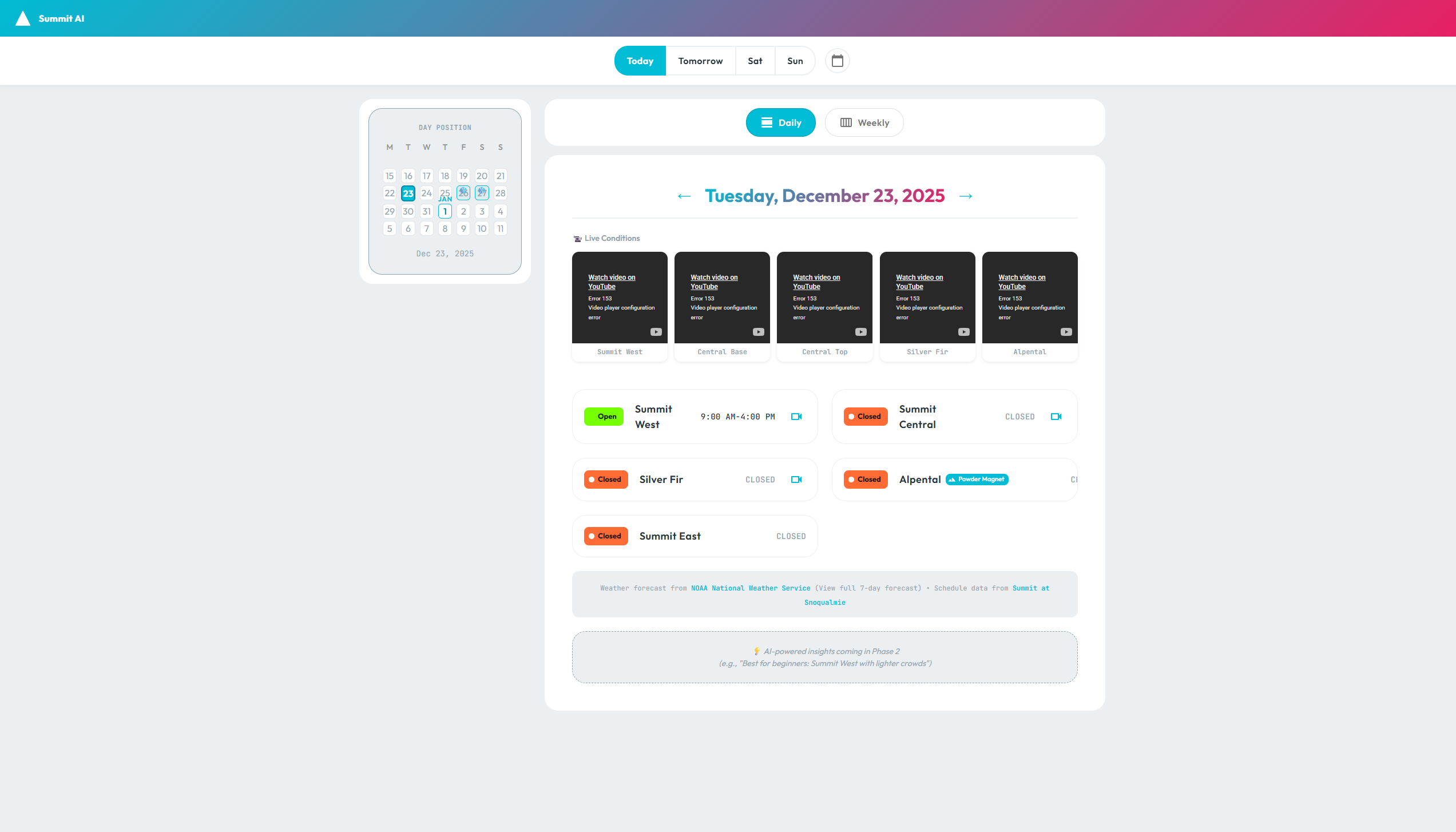
Summit AI scrapes the official Summit at Snoqualmie website daily to provide up-to-date information on:
- 5 Base Areas: Summit West, Summit Central, Silver Fir, Alpental, and Summit East
- Operating Hours: Exact open/close times for each area
- Status Indicators: Color-coded badges (Open ✅, Closed ❌, TBD ⏳)
- Special Tags: “Powder Magnet” for Alpental (gets the most snow!)
2. Live Weather Integration (NOAA)
Instead of relying on third-party weather APIs with rate limits or paywalls, Summit AI fetches data directly from the National Weather Service (NOAA) for Snoqualmie Pass:
- 7-Day Forecast: Temperature, conditions, wind speed
- Snowfall Predictions: Tracks accumulation for powder alerts
- Powder Alerts: Automatic banners when ≥3” of snow is forecasted
- Fresh Snow Badges: 1-3” = “Fresh Snow,” 3”+ = “POWDER ALERT” ❄️
The NOAA API is free, reliable, and doesn’t require authentication—perfect for a hobby project!
3. Interactive Calendar Navigation
A custom calendar component shows:
- Week/day position indicators: See where you are in the month
- Snow icons on forecast days: Visual indicators for expected snowfall
- Quick date jumps: “Today,” “Tomorrow,” shortcuts for fast navigation
- Clickable dates: Jump to any day instantly
4. Dual View Modes
Daily View — Deep dive into a single date:
- All 5 base area statuses and hours
- Weather forecast details
- Live webcam previews (see below)
- Powder alerts with exact accumulation amounts
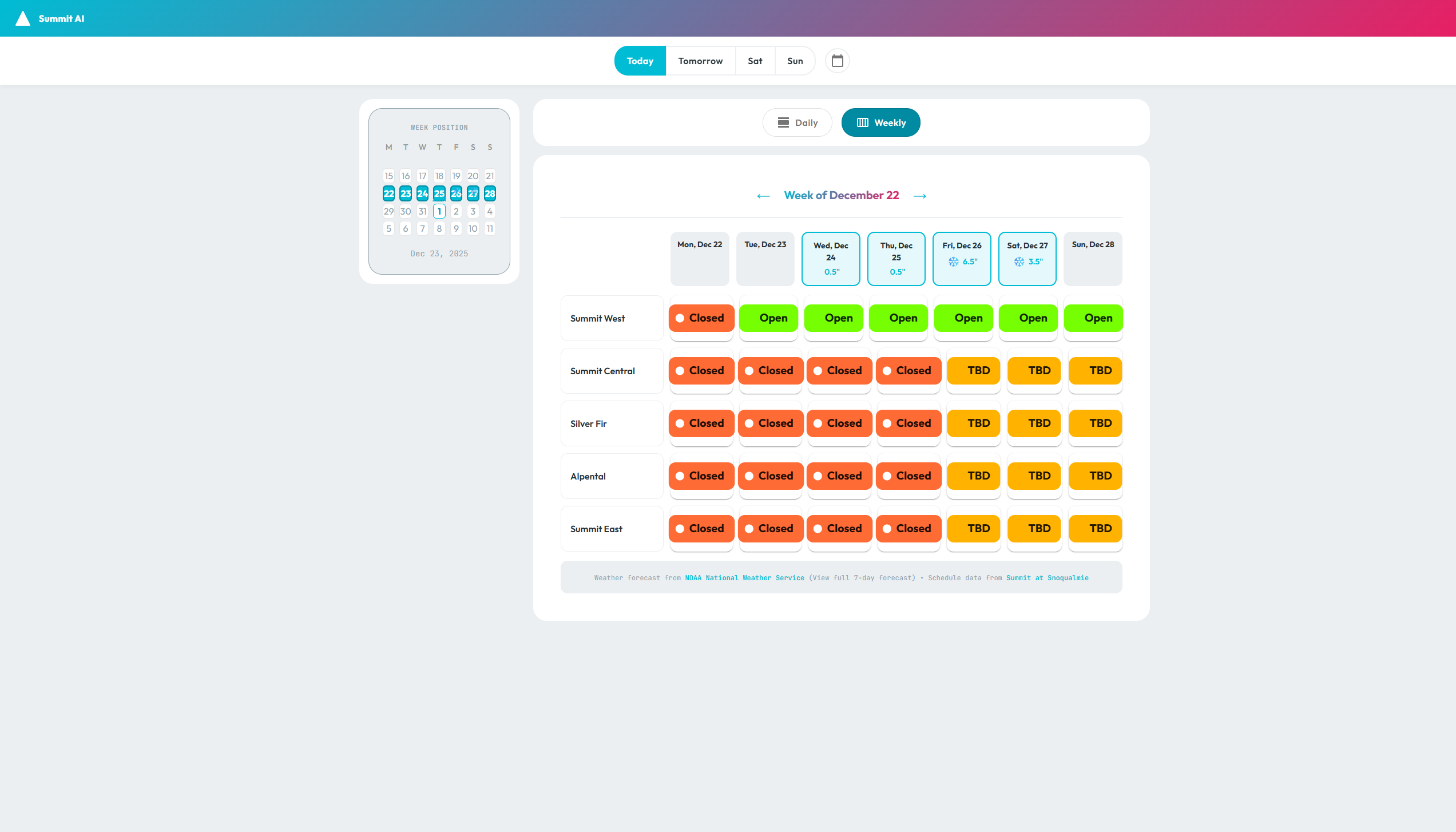
Weekly View — At-a-glance 7-day overview:
- Compact grid showing all areas across the week
- Snow accumulation badges on each day
- Color-coded status cells for quick scanning
- Click any day to jump to detailed daily view
5. Live Webcam Integration
One of my favorite features: embedded YouTube webcams showing live conditions at each base area.
Desktop Experience:
- 5 webcam previews in the left sidebar (under the calendar)
- 2-column grid with labels for each area
- Hover-to-expand: Mouse over any webcam to see a full-size overlay in the center of the screen
Mobile Experience:
- Horizontal scrollable row of webcam previews
- Optimized for touch navigation
- Saves vertical space for schedule content
The webcams use YouTube’s embed API with autoplay disabled (per user preference standards) and are sourced from Summit’s official channels.
6. Fully Responsive Design
Summit AI adapts seamlessly from desktop to mobile:
Desktop (≥900px):
- Side-by-side layout: Calendar/webcams on the left, schedule on the right
- Sticky positioning keeps calendar visible while scrolling
- Hover interactions for webcams and schedule details
Mobile (<900px):
- Stacked vertical layout: Calendar → Webcams → Toggle → Schedule
- Touch-friendly buttons and navigation
- Optimized font sizes and spacing

7. Powder Alert System
The app automatically calculates snowfall based on NOAA forecasts and displays:
- Powder Alert Banner (≥3” snow in 24hrs): Bright cyan highlight with snowfall amount
- Fresh Snow Banner (1-3” snow): Green success banner
- Calendar Snow Icons (❄️): Visual indicators on dates with predicted snowfall
This makes it easy to spot the best days to hit the slopes!
Tech Stack
- Frontend: React 18 + TypeScript + Vite
- UI Framework: Material-UI (MUI) v5
- Styling: Design tokens for colors, typography, spacing
- Data Sources:
- Summit at Snoqualmie (web scraping via backend API)
- NOAA National Weather Service (public API)
- YouTube (embedded live webcams)
- Hosting: Azure Static Web Apps (with CDN)
- Backend: Express API for schedule scraping and caching
Design Philosophy
I wanted Summit AI to feel modern and polished while being blazingly fast. Key decisions:
- Gradient Header: Teal-to-pink gradient matches ski culture vibes
- Status Color Coding:
- Green (Open) = Good to go ✅
- Orange (Closed) = Stay home ❌
- Yellow (TBD) = Check back later ⏳
- Typography Hierarchy: Clear headings, readable body text, and compact data tables
- Micro-interactions: Smooth transitions, hover effects, and animations
- Performance: React Query for caching, lazy-loaded images, optimized bundle size
Challenges & Solutions
Challenge 1: Real-Time Schedule Data
Problem: Summit’s website doesn’t have a public API.
Solution: Built a backend scraper that runs daily (Azure Functions) and caches the schedule data as JSON. The frontend fetches from this cached endpoint.
Challenge 2: Weather Forecast Parsing
Problem: NOAA’s API returns raw text descriptions like “Snow likely, mainly after 4pm.”
Solution: Implemented regex parsing to extract snowfall amounts (“3 to 5 inches”) and normalize them into numeric values for powder alerts.
Challenge 3: Responsive Webcams
Problem: YouTube embeds are heavyweight and can slow down the page.
Solution: Used lazy loading (loading="lazy") and conditional rendering (only load on viewport visibility). Also disabled autoplay until user hovers (desktop) or taps (mobile).
Challenge 4: Calendar State Management
Problem: Syncing calendar selection with daily/weekly view navigation.
Solution: Lifted state to the root ScheduleView component and passed callbacks down. Week view calculates Monday-start week dynamically.
What’s Next?
Phase 2 Features (coming soon):
- 🤖 AI-Powered Insights: “Best for beginners today: Summit West” (using GPT-4)
- 📊 Historical Data: “This day last year had 12” of powder”
- 🎿 Crowd Predictions: “Expect heavy traffic on weekends”
- 🔔 Push Notifications: “Powder alert for tomorrow!”
Lessons Learned
- Design Tokens are Worth It: Centralizing colors, spacing, and typography made theming painless.
- NOAA’s API is Underrated: Free, reliable, and well-documented. More devs should use it!
- Playwright for Screenshots: Automated screenshot capture (used for this blog post!) is a game-changer for documentation.
- Monorepo Power: NX made it easy to share types between frontend/backend and run tests across the entire stack.
Try It Yourself
🔗 Live App: summit-ai.maassel.dev
💻 Source Code: (Private repo, but happy to discuss implementation!)
If you’re a skier or snowboarder in the Pacific Northwest, give Summit AI a try and let me know what you think! I’m always open to feedback and feature suggestions.
Tags: #React #TypeScript #Vite #MaterialUI #WeatherAPI #WebScraping #Azure #NXMonorepo #ResponsiveDesign
Have questions about how I built this? Want to discuss the architecture or design decisions? Feel free to reach out!